Dashboard: fee, KPIs, and follow-ups
Written By Talenkai
Last updated 23 days ago
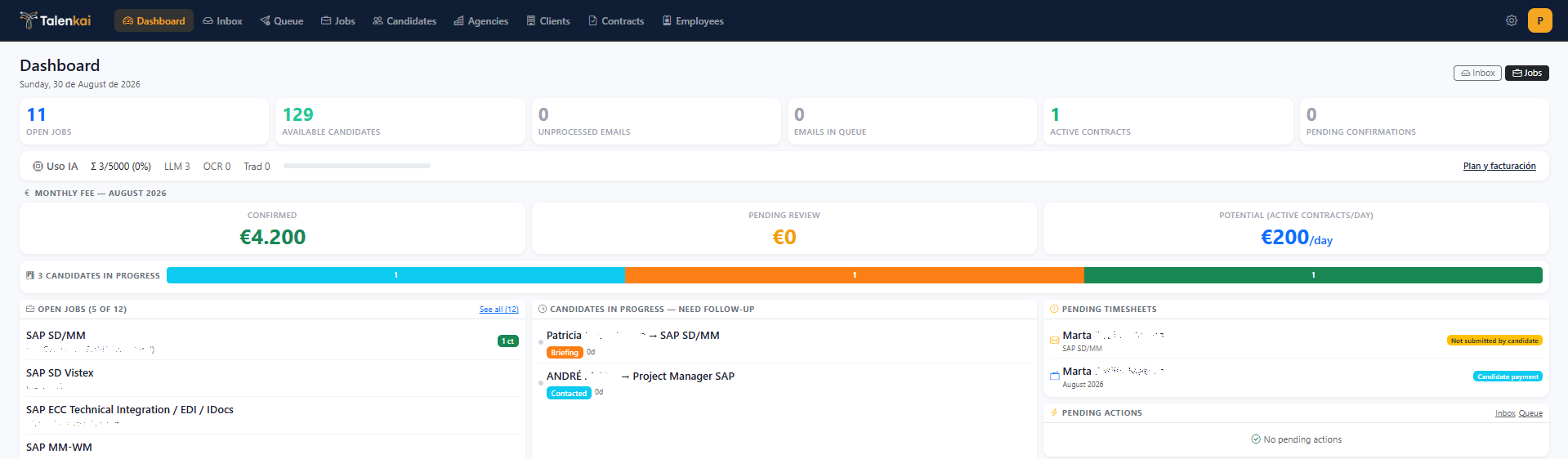
The dashboard is the morning view of the desk — open it before Gmail.
What you typically see
Counts for open jobs, candidates, inbox / queue pressure.
Monthly fee: confirmed vs pending review.
Pipeline slice: candidates in process.
Lists that need action: follow-ups due, timesheets, stalled operations.
How to use it
Clear red / due follow-ups first.
Drain Inbox and Outbox if they are backing up.
Check fee pending review (timesheets or commercial validation).
Only then deep-work a single job kanban.
What it is not
It is not a vanity BI suite. If something is listed, click through and finish the action. Leaving stale follow-ups teaches the team to ignore the dashboard.
AI quota
When shown, monthly AI usage helps you plan bulk CV imports without surprising the desk mid-search.
Related: Kanban and follow-ups, Timesheets for contractors.
Still need help? Ask the team