Public jobs portal
Written By Talenkai
Last updated 23 days ago
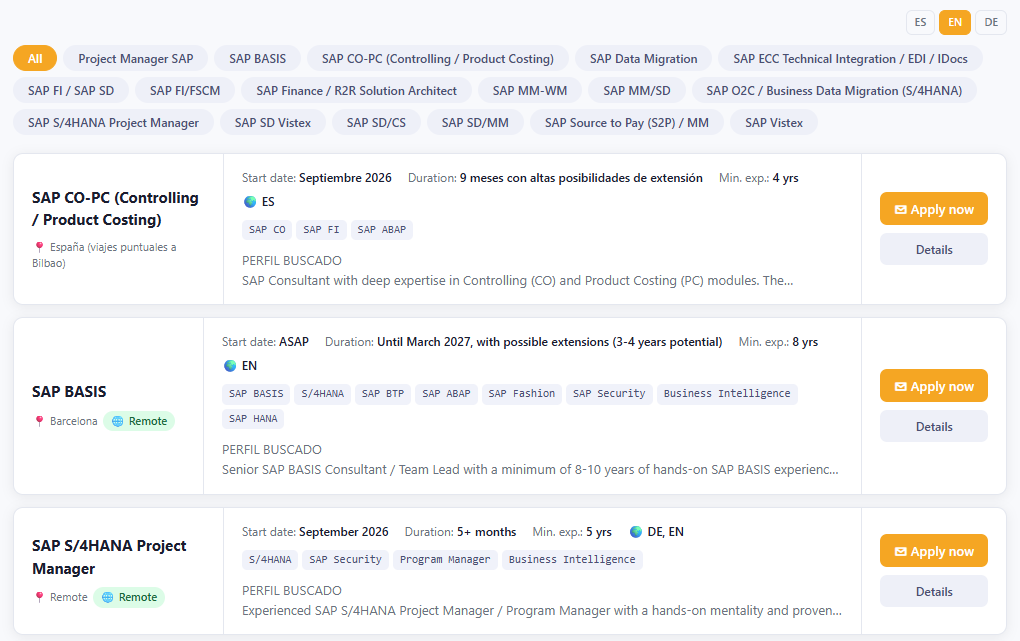
The public jobs page lets you advertise open roles without giving candidates access to the ATS.
What it is for
Career-page or LinkedIn “apply here” links.
Sending a client or agency a clean list of openings.
Collecting applications back into Talenkai to create or link candidates.
How to use it
Prepare the job inside Talenkai (skill, languages, modality, location, description).
Mark / publish it for the public portal according to the controls on the job or public-jobs settings.
Share the public URL (
ofertas_publicas/ public jobs entry on your deployment).When applications arrive, process them like other inbound candidates: complete fields, then match.
Languages
Candidates may see content in ES / EN / DE depending on configuration. Keep the public text professional and anonymize client names if your process requires it.
What applicants do not get
They do not see your kanban, scores, other candidates, or internal emails. The portal is a front door, not a CRM login.
Good practice
Unpublish filled roles promptly so the portal stays trustworthy. Align public requirements with the fields you actually match on (main skill + languages + modality).
Still need help? Ask the team