Kanban & follow-ups
Written By Talenkai
Last updated 23 days ago
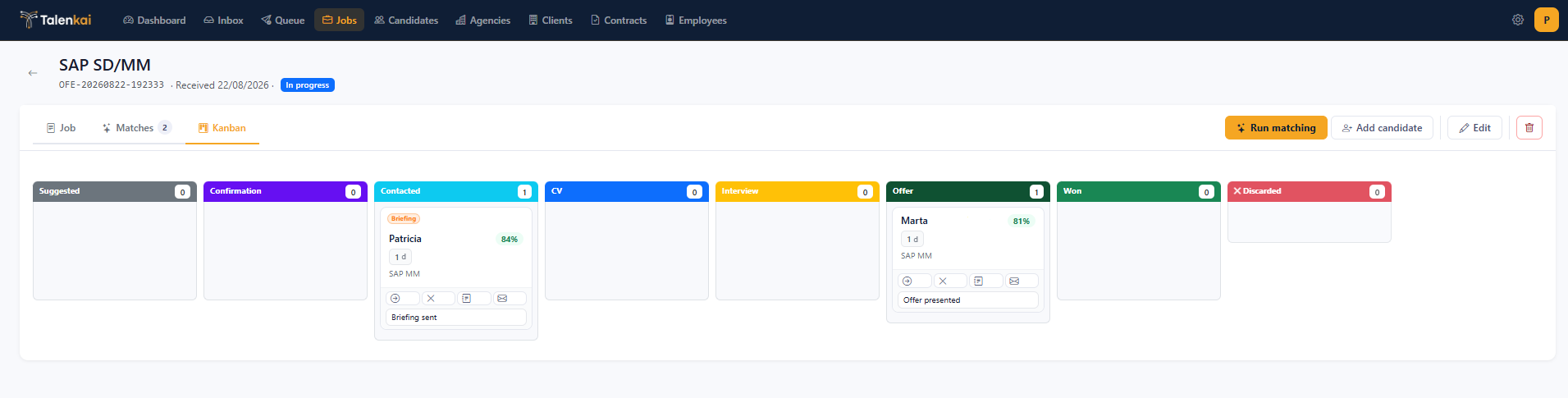
The job kanban is the shared pipeline for everyone on the desk. Each card is a match (candidate ↔ job) moving through stages such as contacted, interview, offer, won, or lost (exact column labels follow your UI language).
How to work the board
Open a job → Kanban view.
Drag or advance cards when the real-world step changes (email sent, interview booked, offer out).
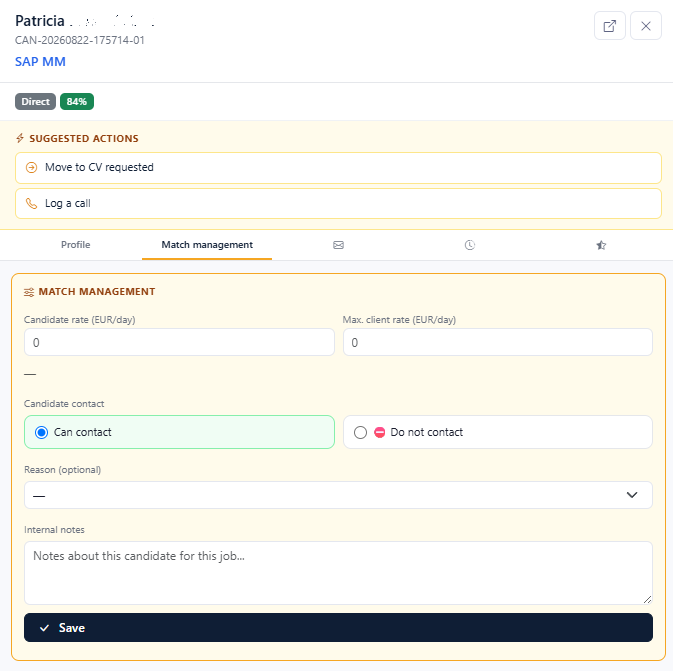
Open the card for score, emails, and next action — do not leave status updates only in your head or in a private mailbox.
Recalculate matching when the brief changes; recalculation is designed to refresh suggestions without wiping the pipeline you already moved.
Follow-ups
Set or complete follow-up dates so stalled matches surface on the dashboard and in lists that need a nudge. A match that sits “waiting for CV” with no date is how placements go cold.
Desk rules that work
One owner visible on the card when several recruiters share the job.
Move the card the same day you send the email or book the interview.
Lost/won should be explicit — do not leave zombies in “interview” for weeks.
Use discard/reject flows when a candidate is out, with a reason if the UI asks for one.
Handoffs
Because the board is shared, another recruiter can continue from Outbox + kanban without forwarding a private Gmail thread. That is the point of boutique mode.
Related: Dashboard, Review queue, From won match to contract.
Still need help? Ask the team